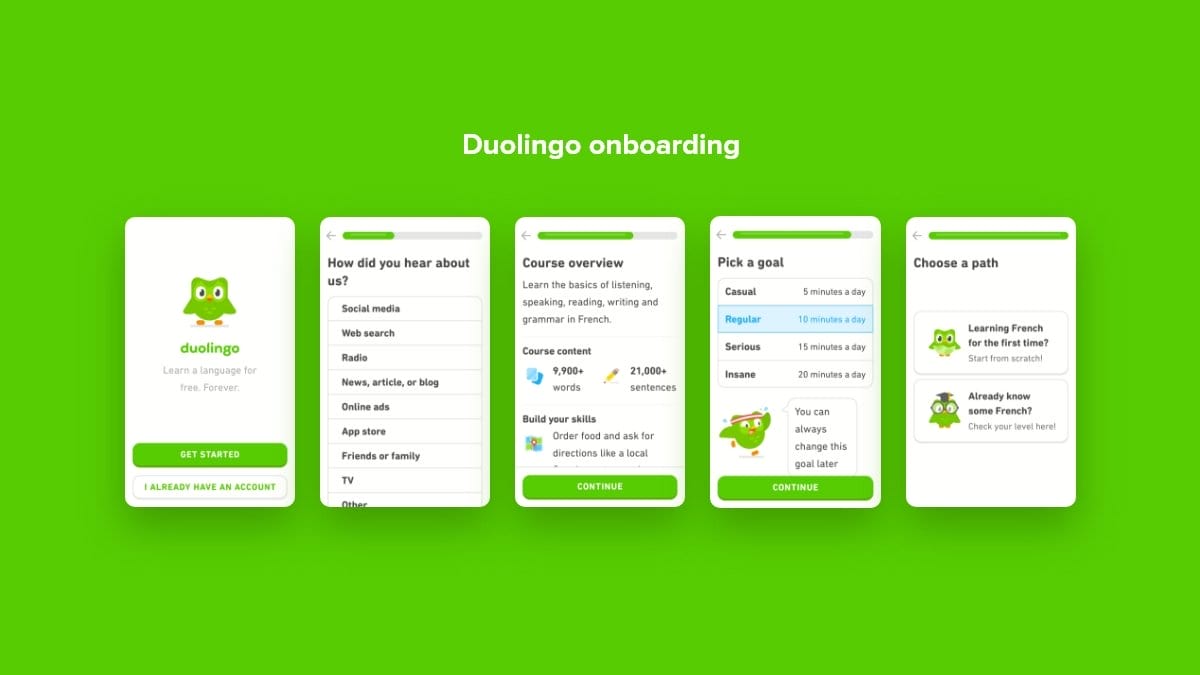
First impressions matter. In the digital world, your product’s onboarding flow is that crucial first impression that can make or break user adoption. Yet despite its importance, onboarding remains one of the most overlooked aspects of product design. A well-designed onboarding experience doesn’t just teach users how to use your product—it shows them why they should care and how it will improve their lives. In this article, we’ll explore how to create onboarding flows that don’t just avoid sucking, but actively delight and retain users from day one.
Understanding the Purpose of Onboarding
Effective onboarding solves three fundamental challenges: it reduces user abandonment, shortens time to value, and establishes patterns for ongoing product usage. Before diving into design tactics, we need to understand what makes onboarding successful in the first place.
The Three Pillars of Successful Onboarding
Value Demonstration:
• Show users what they can accomplish, not just features
• Connect product capabilities to user goals
• Create “aha moments” early in the experience
Reduced Friction:
• Minimize required inputs
• Break complex tasks into manageable steps
• Provide clear guidance without overwhelming
Emotional Connection:
• Establish brand personality through copy and visuals
• Celebrate user milestones and progress
• Create moments of delight that build positive associations
The most common mistake companies make is treating onboarding as a feature tutorial rather than a value introduction. Users don’t care about your features—they care about what those features will help them achieve.
Key Components of Effective Onboarding Flows
Now that we understand the purpose of onboarding, let’s examine the essential components that make up a successful onboarding experience.
Welcome Screens That Set Expectations
Your welcome screen serves as the front door to your product experience. It should immediately communicate:
Value Proposition:
• What problem does your product solve?
• How will users benefit from using it?
• What makes your approach unique?
Next Steps:
• What will the onboarding process involve?
• How long will it take?
• What information will users need to provide?
The best welcome screens avoid generic statements like “Welcome to [Product]!” in favor of benefit-focused messages like “Create beautiful designs in minutes” or “Manage your finances with confidence.”
Progressive Account Creation
Nothing kills momentum faster than a lengthy sign-up form before users have experienced any value. Consider these approaches instead:
Delayed Registration:
• Allow users to explore core functionality before creating an account
• Demonstrate value before asking for commitment
• Use soft barriers that highlight benefits of registration
Progressive Disclosure:
• Request only essential information upfront
• Collect additional details as they become relevant to usage
• Explain why each piece of information improves the experience
Social Sign-in:
• Offer authentication through existing accounts
• Clearly communicate what permissions you’re requesting
• Provide traditional email signup as an alternative
Remember that each additional field in your signup form will reduce conversion rates. Ask yourself: “Do we need this information now, or can it wait until later?”
Personalization That Matters
Personalization has become a standard part of onboarding, but many implementations miss the mark. Effective personalization should:
Focus on Use Cases, Not Demographics:
• Ask about goals rather than arbitrary preferences
• Use responses to customize the initial experience
• Show relevant examples based on user needs
Provide Clear Benefits:
• Explain how personalization improves the experience
• Allow users to skip personalization steps if desired
• Show immediate evidence of personalization’s impact
“First-time users don’t care about your product. They care about becoming better versions of themselves.”
Kathy Sierra, Author of “Badass: Making Users Awesome”
Implementing Interactive Learning
Once users are in your product, you need to guide them toward meaningful interactions. Static tutorials rarely work well because users learn by doing, not watching.
Guided Interactions vs. Product Tours
Traditional product tours force users to passively observe features before they understand why those features matter. Interactive guidance takes a different approach:
Contextual Hints:
• Provide guidance at the moment of need
• Focus hints on the next logical action
• Allow users to dismiss or disable hints easily
Task-Based Learning:
• Guide users through completing a meaningful task
• Choose tasks that showcase core value propositions
• Celebrate completion to build confidence
Interactive Tooltips:
• Connect tooltips to specific UI elements
• Keep explanations concise and action-oriented
• Use tooltips sparingly for only the most important elements
The key difference is that effective onboarding treats users as active participants rather than passive observers. It invites them to learn through action rather than telling them what they’ll be able to do later.
Empty States as Onboarding Opportunities
Empty states—screens where no content exists yet—are powerful onboarding opportunities that are often wasted with generic messages like “No items found” or “Your dashboard is empty.”
Instructional Empty States:
• Explain what should appear here and why it matters
• Provide clear calls to action for creating first content
• Use illustrations that clarify the expected content
Sample Data Options:
• Offer to populate with sample data for exploration
• Show previews of what the filled state will look like
• Make it easy to remove sample data when ready
Empty states should inspire action rather than creating the impression of an incomplete or broken product. They’re opportunities to guide users toward the actions that generate their first moments of value.
Measuring and Optimizing Onboarding Success
Creating an effective onboarding flow isn’t a one-time design task—it requires ongoing measurement and refinement. Here’s how to approach it systematically:
Key Metrics for Onboarding Performance
Completion Rate:
• Percentage of users who complete the entire onboarding flow
• Drop-off points where users abandon the process
• Time spent in each onboarding stage
Activation Rate:
• Percentage of users who reach key “aha moments”
• Time to first meaningful action
• Conversion from free to paid (if applicable)
Long-term Retention:
• Day 1, 7, and 30 retention rates
• Correlation between onboarding patterns and retention
• Feature adoption following onboarding
These metrics should be tracked continuously and segmented by user characteristics, acquisition channels, and any A/B test variations you’re running.
“The first mile of a product experience is increasingly neglected, yet it is perhaps the most important to get right.”
Scott Belsky, Chief Product Officer at Adobe
Common Pitfalls to Avoid
Even well-intentioned onboarding flows can fall into these common traps:
Feature Overload:
• Trying to showcase every feature during onboarding
• Overwhelming users with too many options too soon
• Focusing on product capabilities rather than user outcomes
Excessive Length:
• Creating too many onboarding steps
• Failing to provide progress indicators
• Not allowing users to skip or postpone steps
Forgetting Context:
• Ignoring how users arrived at your product
• Using the same onboarding for all user segments
• Failing to acknowledge returning users
The most successful onboarding experiences are those that feel invisible—they guide users naturally toward value without feeling like an obstacle course that must be completed before the real experience begins.
Conclusion: Onboarding as Ongoing Conversation
The best onboarding flows aren’t one-time events but the beginning of an ongoing conversation with your users. They establish patterns for how your product will communicate, assist, and evolve with users over time.
Effective onboarding should feel less like an instruction manual and more like a helpful guide who’s genuinely invested in the user’s success. It should create moments of delight, eliminate friction, and—most importantly—show users not just how to use your product, but why it matters to their lives or work.
As you design your next onboarding experience, remember that your goal isn’t to create the perfect tutorial—it’s to help users achieve their goals through your product as quickly and effortlessly as possible. Do that well, and you won’t just have users who understand your product; you’ll have advocates who can’t wait to tell others about it.
ABOUT TRIPSIXDESIGN
Tripsix Design is a creative agency based in Fort Collins, Colorado and Manchester, England. We specialize in branding, digital design, and product strategy – combining creativity with data-driven insight to deliver tailored, high-impact solutions. Small by design, agile by nature, we’re dedicated to producing thoughtful, high-quality work that drives results.
If you like what you’ve read here and would like to know more, or want to know how we can support your business growth, then connect with us here.
SOURCES
User Onboarding – Samuel Hulick’s comprehensive resource for creating better onboarding experiences.
Hooked: How to Build Habit-Forming Products – Nir Eyal’s framework for building user engagement through behavioral design.
Appcues Blog – Collection of onboarding best practices and case studies from successful products.